
Right First Time: Your VEEC compliance update so nothing holds up your payment
Over the last three months, we've had questions come through on a few compliance points.
We've pulled the answers together below to put you in the best position to quote accurately and get paid even faster.
But first, some good news:
The Onsite app got two upgrades that makes your life easier:
Compliance label photos now come through in higher resolution
The app keeps working even with patchy or no signal on site. Installers can keep going and everything syncs once they're back in coverage. Read the full details on the offline upgrade here.
Most asked question: who signs the Consumer Agreement? (HW and AC)
Here's the breakdown by scenario:
1. Renovations
In most cases, the premise owner signs.
If the builder is your main point of contact, they can sign on the owner's behalf instead, but we'll need two things in writing
the owner's authorisation for the builder to sign on their behalf, and
confirmation the owner knows a VEEC benefit is being passed on (or a tax invoice to the end consumer showing the discount passed on).
This extra evidence protects you too. It covers you if the benefit doesn't end up reaching the owner, or if the VEU ever queries the claim.
2. Real estate agency upgrades
The agency is authorised to sign.
List the owner's name on the invoice as "[Agency] on behalf of [Owner]," along with a phone number and email.
If you're entering the agent as the end consumer in the GEO Form, set the Entity field to Individual. The system owner is still an individual, even though the agency's the point of contact.
3. New build upgrades
The builder signs and is entered as the end consumer. They're the authorised party for that property while the build's underway, so no extra evidence needed here.
Keeping the Onsite app updated (HW and AC)
New Onsite improvements only kick in once you've updated the app, so it's worth checking every so often:
Check if an update is available.
Switch on auto-updates on your phone.
Check your battery-saver or data-saver settings. These can quietly block auto-updates without you noticing.
Licensed vs Registered Installers (HW and AC)
We've identified a few cases of Registered installers certifying work outside what they're actually permitted to do.
Here is quick clarification:
If someone's only Registered in a class, they can only work within that class.
Licensed installers can only issue a compliance certificate for the class their licence covers.
Please ensure your installers are only completing and certifying work within their licensed class.
Every claim requires a Licensed Plumber to be selected.
The Registered Plumber field is optional,
the VEEC Installer Agreement can be accepted by either the Licensed or Registered Plumber.
AC Reminders
1. Multi-split sizing: the VEU sizes units by heating capacity, not cooling capacity, so check against their sizing guide with that in mind.
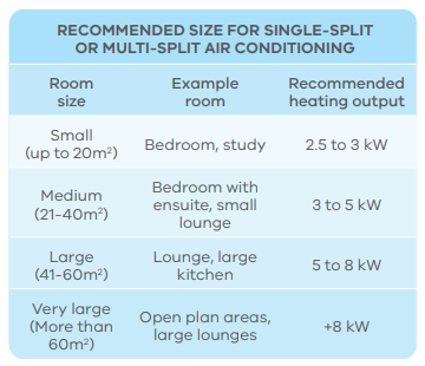
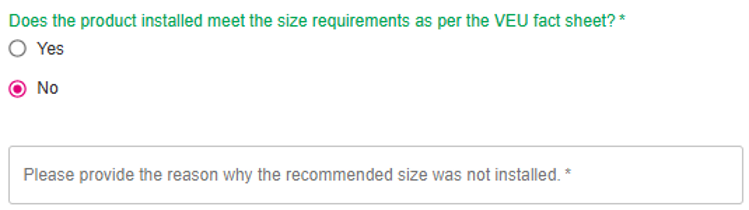
If the heating capacity of an installed indoor unit does not meet the VEU’s sizing guide, you'll need to submit a justification with the claim.
Easiest way to do this: answer directly in the GEO Form field, "Does the product installed meet the size requirements as per the VEU fact sheet?". That avoids RFIs, and allows us to pay you faster.
2. Slab heaters with multiple zones: these can now be claimed as separate systems, but each one needs to heat at least 100m².
A floor plan will need to be provided with these claims, showing the zones and areas serviced by the old slab heater.
3. GST Clarification
For residential jobs, GST generally isn't paid, except on new builds where the builder is GST-registered and signing off on the upgrade.
For commercial jobs, GST is paid only if the consumer is GST-registered against their ABN.
Hot Water reminders
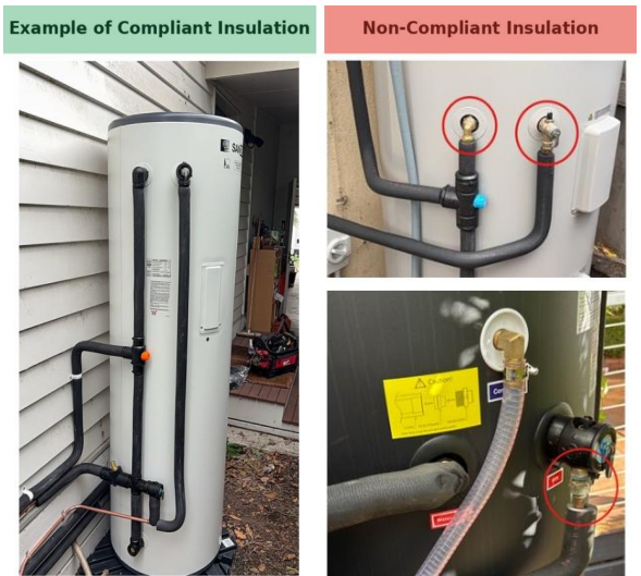
1. Lagging/Insulation:
Cold water inlet,
Hot water outlet,
Hot water pipe,
PTR valve
All these parts must be insulated to the required R-value for at least the first 500mm from the tank.
This includes all elbow joints.
The PTR drain pipe must also have at least 500mm of insulation up to the valve.
There must be no exposed pipework between insulated sections.
All insulation materials must comply with AS/NZS 3500.4, Section 8.
2. PTR Valve - Termination Location
We've seen more non-compliant termination location and designs lately. Here's what to check on PTR drainage termination so nothing slows your payment down.
The drain:
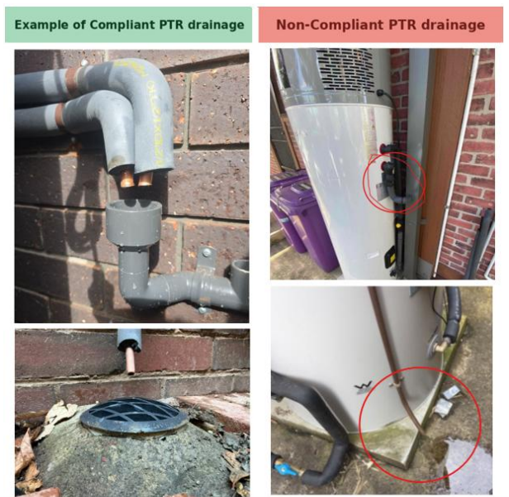
Here are some examples of compliant PTR drainage
Must be routed away from the PTR valve operating area and must discharge in a safe direction, away from operators and any persons nearby
Must not discharge directly into a downpipe or stormwater drainage system where the discharge may not be readily discernible or may be affected by blockage or surcharge.
Must not be configured with an overflow relief, opening, or fitting that may discharge hot water horizontally at height if the drain downstream becomes blocked.
Must not be extended or interconnected with other services unless all materials used are suitable for the expected discharge temperature ratings.
The drain termination point:
Must maintain a 75–300 mm air gap above the gully, surface stormwater drain, or tundish
Must not be vertically below the PTR valve, or on a walkway or path.
Must not be positioned to discharge directly onto a hard surface, towards electrical equipment, or in a way that may cause hot water or steam to splash towards persons or electrical components in the vicinity.
If the tank is installed indoors, the drainage pipe must be connected to a suitable plumbing drainage system or run through the wall to the outside, where it terminates in a safe and compliant location.
Overall, the drainage location must comply with AS/NZS 3500.4 Clauses 5.8, 5.9.4, 5.11.1 and 5.11.3.
For more information, please refer to the Solar Victoria guidelines:
Here are some examples of compliant and non-compliant in situ photos:
4.1 Safe drainage – Potential hazards or unsafe installations
4.2 Safe drainage – Methods of compliance
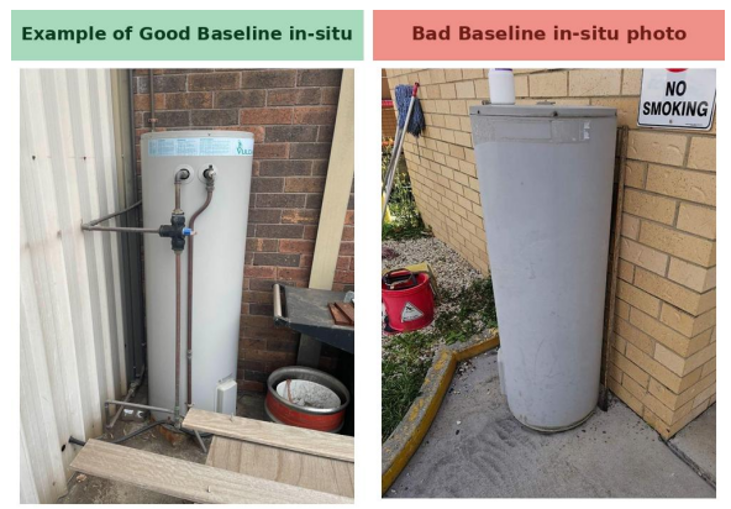
3. Baseline in-situ photos
For a replacement claim, the existing system photo needs to clearly show:
The pipework connected to the system and connected to the site,
The surrounding wall or location, and
The full tank.
Any of this unclear, call us. We're happy to talk it through.

Chloe Mills
03 9805 0742
chloe.mills@greenenergytrading.com.au

Maia Germano
03 9805 0743
maia.germano@greenenergytrading.com.au

Nadine Youm
03 9805 0700
nadine.youm@greenenergytrading.com.au

Ash Chan
03 9805 0793
ashley.chan@greenenergytrading.com.au